Skip to content
← Tool library

LosslessCut · 3.70.1

Trim unwanted footage in a few steps

Mark a segment’s start and end, then export it in a desktop interface. Useful for preparing long recordings before editing, without re-encoding in the usual lossless workflow.
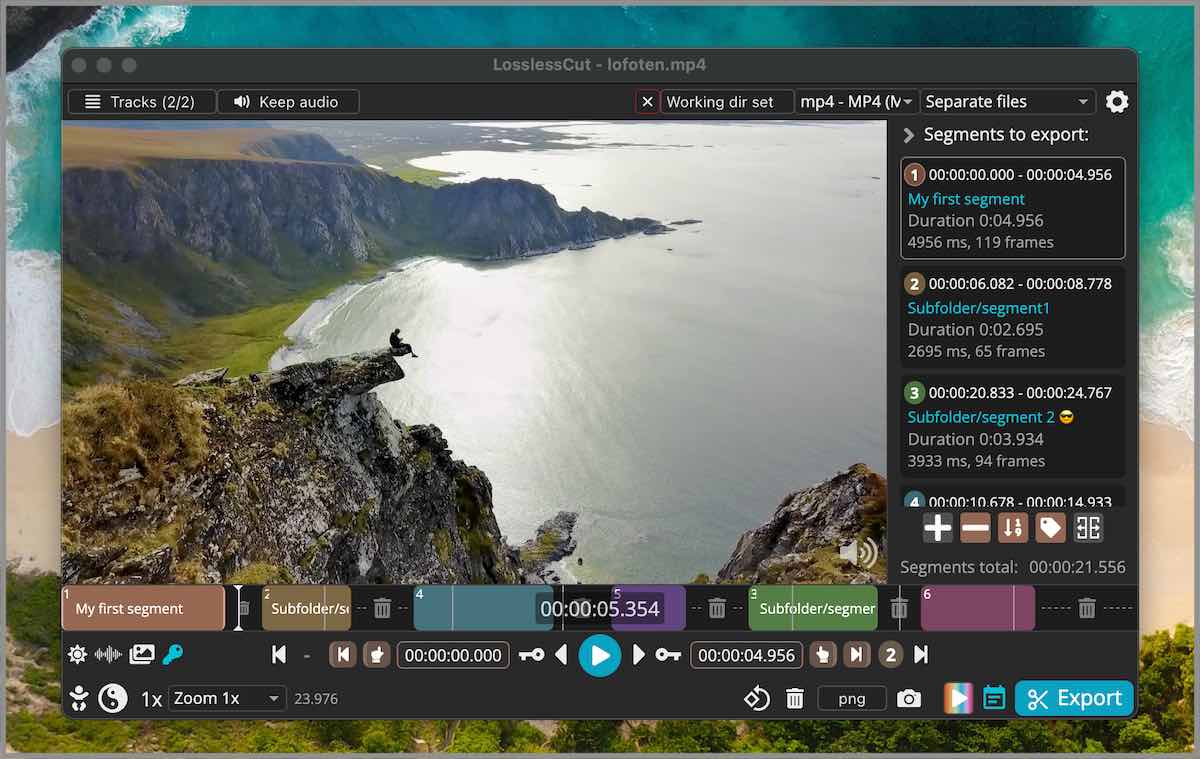
Upstream LosslessCut interface showing selected segments and Export

Tap the image to view full size ↗

Screenshot from the original LosslessCut repository · GPL-2.0; interface may vary by version · GitHub

Where it helps

Prepare a long interview or tutorial recording by keeping the useful section before taking it into your editor. Start with one segment; no Claude, Codex or cloud upload is needed.

Start here: download the app for your computer

A computer: 64-bit Windows 10/11, macOS 12+, or Linux compatible with the x64 build. Windows needs a 7z extractor; on Mac choose Apple Silicon or Intel. Check the release requirements for your computer.

Official GitHub downloads are free under GPL-2.0. Trimming local files needs no subscription, AI account or API credits. Paid app-store editions are an optional way to support the project.

Official app files for version 3.70.1. The source ZIP is for source inspection, not the ready-to-run app. Downloading on a phone does not make it a phone app.

Original installation instructions ↗

From a long file to a clip you can review

  1. Choose your computer’s download. Windows: extract the 7z and run LosslessCut.exe from its folder; macOS: open the DMG and drag the app to Applications; Linux: allow the AppImage to run as a program in file properties, then open it; check your distribution’s requirements.
  2. Open the app and drag in a short video. Mark the start and end of the section to keep on the timeline; default shortcuts are I for start and O for end.
  3. Click Export, review the output folder and filename, then confirm export. Play the result and check the cut points and audio before using it.

By default, selected segments are kept. Check the export mode before confirming, and keep your original during the first trial.

Limits to understand

  • Lossless cuts may start near a keyframe rather than the exact requested moment. Review the output; Smart Cut is experimental.
  • This is not a full editor for effects, titles and transitions. Some media formats need different playback or export settings.
  • Upstream treats newer GitHub builds as public beta tests, so bugs are possible. We verified sources, links and this site; we did not install the app or benchmark cut quality.

Original sources

Source reviewed: 2026-10-20 · 2610190

LosslessCut

Download and setup, made simple

Download app · choose your computer

Computers only. On Mac: Apple → About This Mac; Chip means Apple Silicon, Processor Intel means Intel. Windows: extract 7z before opening the app; Mac: open DMG and drag to Applications; Linux: allow the AppImage to run as a program.

LosslessCut · 3.70.1

Windows x64 · 7z archive ↓macOS Apple Silicon · DMG ↓macOS Intel · DMG ↓Linux x64 · AppImage ↓
Source ZIP · not the app
Cost
Free GitHub download; paid store editions are optional
Difficulty · our assessment
Easy · beginner-friendly

Free without a subscription

Download the official GitHub app and trim local files. No subscription, account or API credits are needed; paid store editions are optional.

Approachable for one-segment trimming: open a video, mark start/end and export. Windows first needs 7z extraction; review the exported cut points.

Start here: download the app for your computer

Before you start: A computer: 64-bit Windows 10/11, macOS 12+, or Linux compatible with the x64 build. Windows needs a 7z extractor; on Mac choose Apple Silicon or Intel. Check the release requirements for your computer.

  1. Choose your computer’s download. Windows: extract the 7z and run LosslessCut.exe from its folder; macOS: open the DMG and drag the app to Applications; Linux: allow the AppImage to run as a program in file properties, then open it; check your distribution’s requirements.

  2. Open the app and drag in a short video. Mark the start and end of the section to keep on the timeline; default shortcuts are I for start and O for end.

  3. Click Export, review the output folder and filename, then confirm export. Play the result and check the cut points and audio before using it.

    First try: keep ten seconds of a sample video, export to a new file and review it.

Official GitHub downloads are free under GPL-2.0. Trimming local files needs no subscription, AI account or API credits. Paid app-store editions are an optional way to support the project.

For normal use, choose your computer’s app file from the download menu. The separate source ZIP is for inspecting code; these steps need no programming commands.

Original GitHub documentation ↗