How I Created the RESILIENT Video
Welcome, I’m Moath. This is the complete breakdown behind RESILIENT: the reference images, prompts and the exact sequence I used to build the 20 second film with Higgsfield and Seedance 2.5. Use it as a starting point for your own version, and tag @moath.alherani when you share what you make. 🖤
Follow me on InstagramStep 1: Build the Character Reference
Explanation
Start with three clear references: your face, the outfit and the sunglasses. Use them to create one consistent character sheet with close, profile, front and back views.
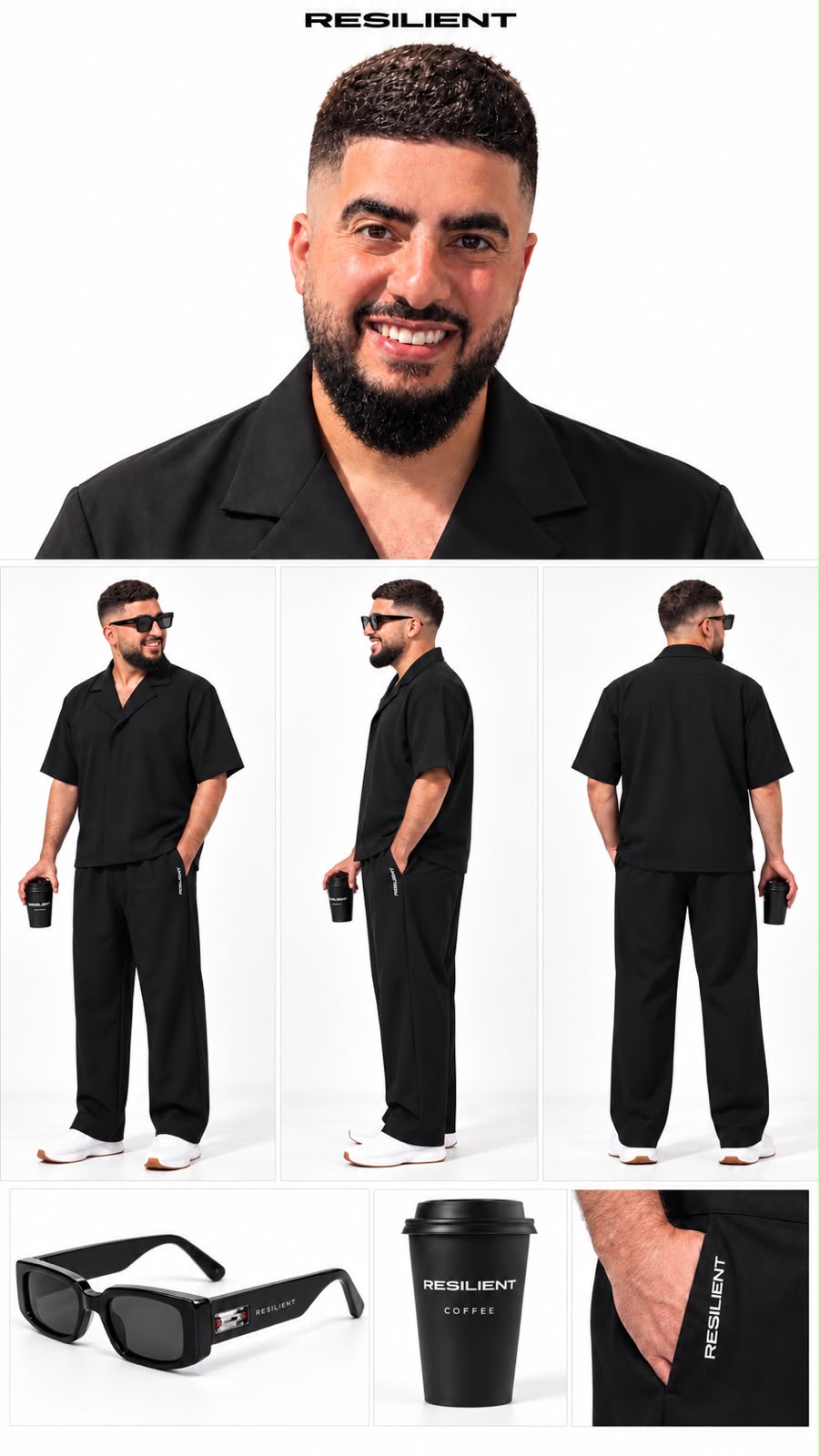
Full-body character reference sheet, seamless white background, soft and even studio lighting, and consistent representation of the character across all views. Face based on my reference selfie: same facial structure, features, and neutral expression in all panels, as well as the hair, which should be identical to the reference image.

Outfit: Take reference from the second image outfit, exactly Same styling And Fabric.

Accessories: Take the same sunglasses From The Third image reference.

Object: A Orange iPhone 17 Pro held naturally in one hand in the full-body views, clearly visible without obscuring the outfit.

No suits or costumes.

Panel order: The first panel is an extreme close-up of the face, very close to the face and occupying most of the frame. The second panel is a full-body profile view, from head to toe. The third panel is a front view framed from the neck down, with the head completely outside the frame, showing only the body and outfit. The fourth panel is a full-body back view, from head to toe.

Horizontal layout, with all four panels positioned side by side.
Step 2: Prepare the Visual References
Explanation
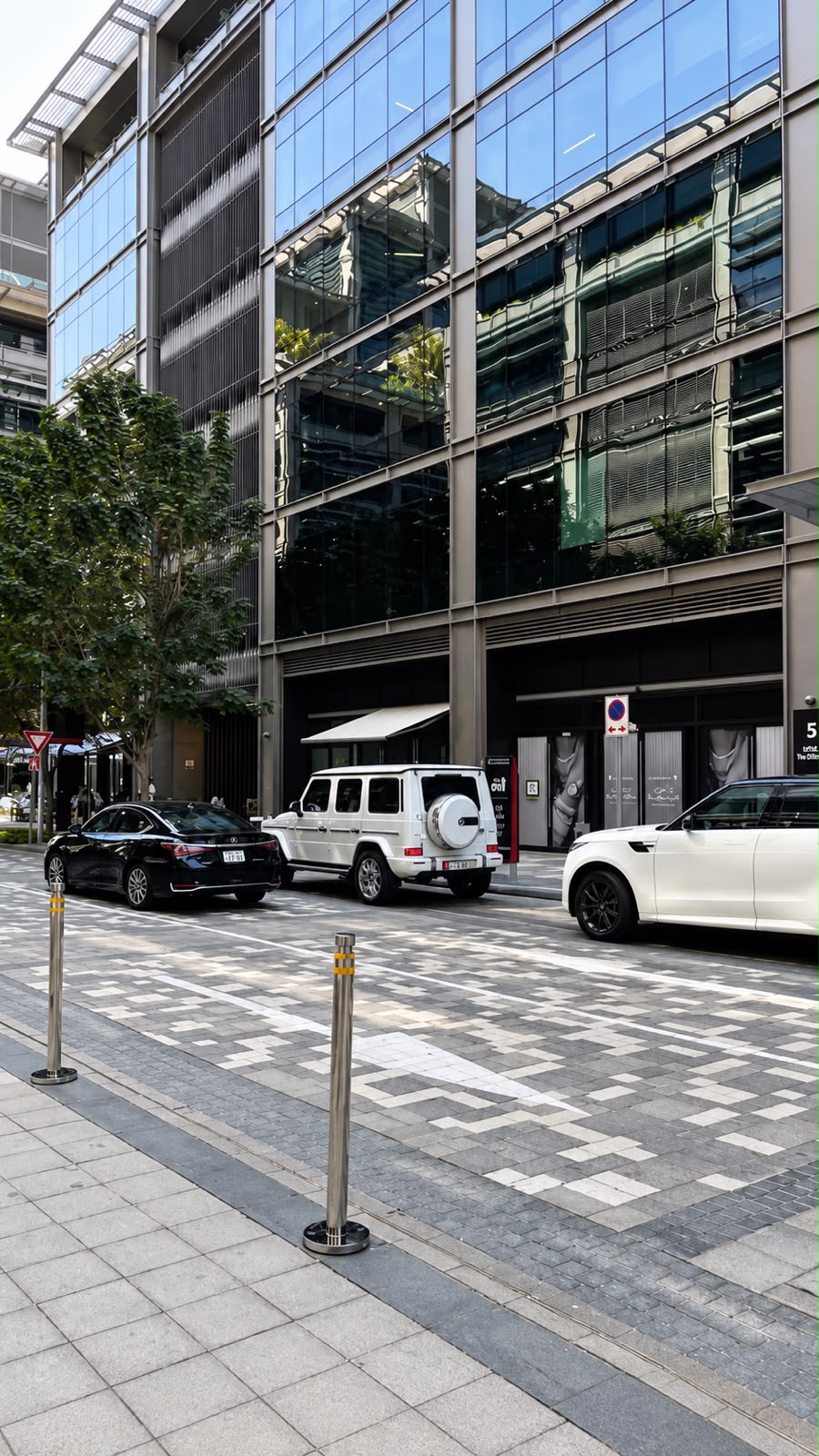
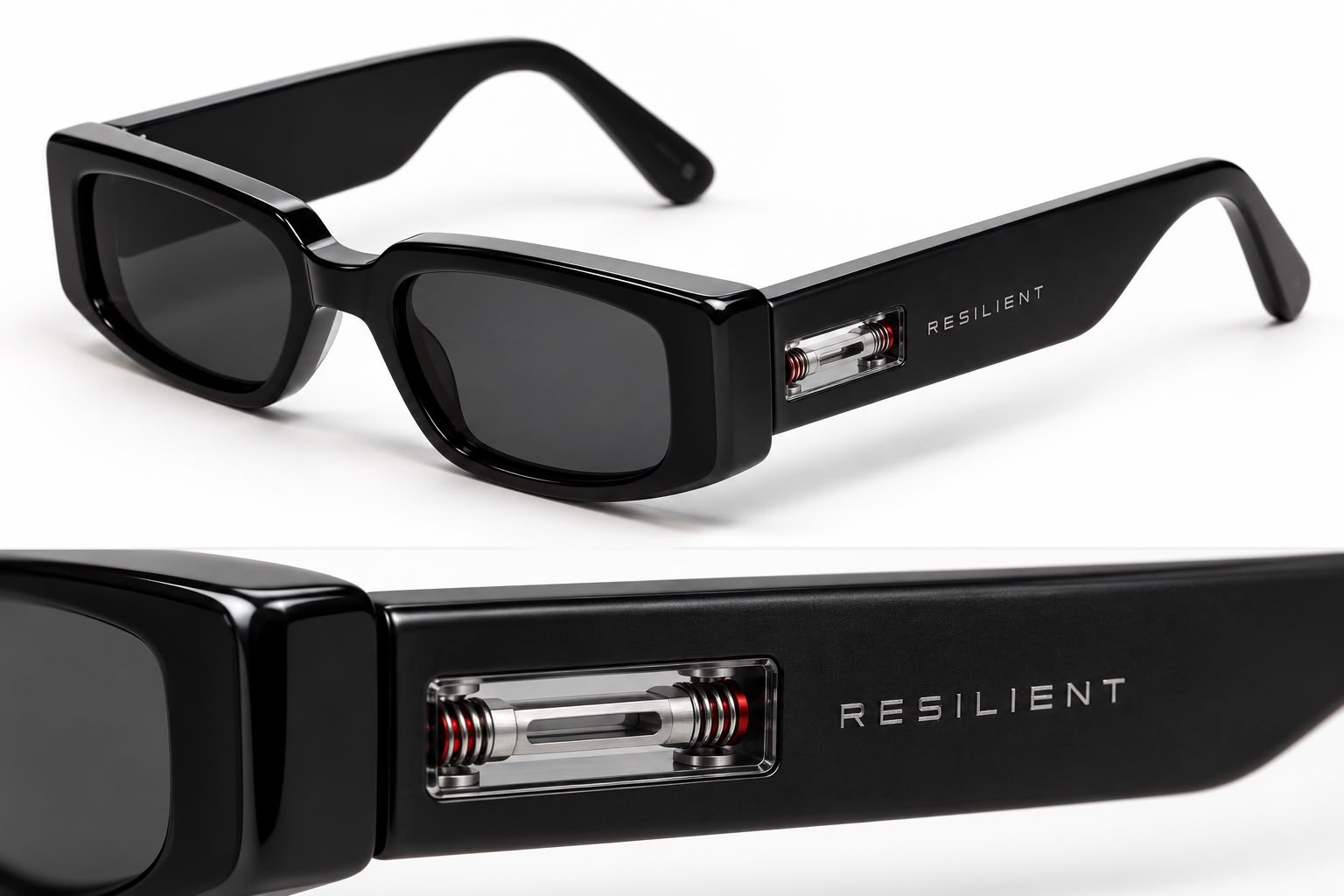
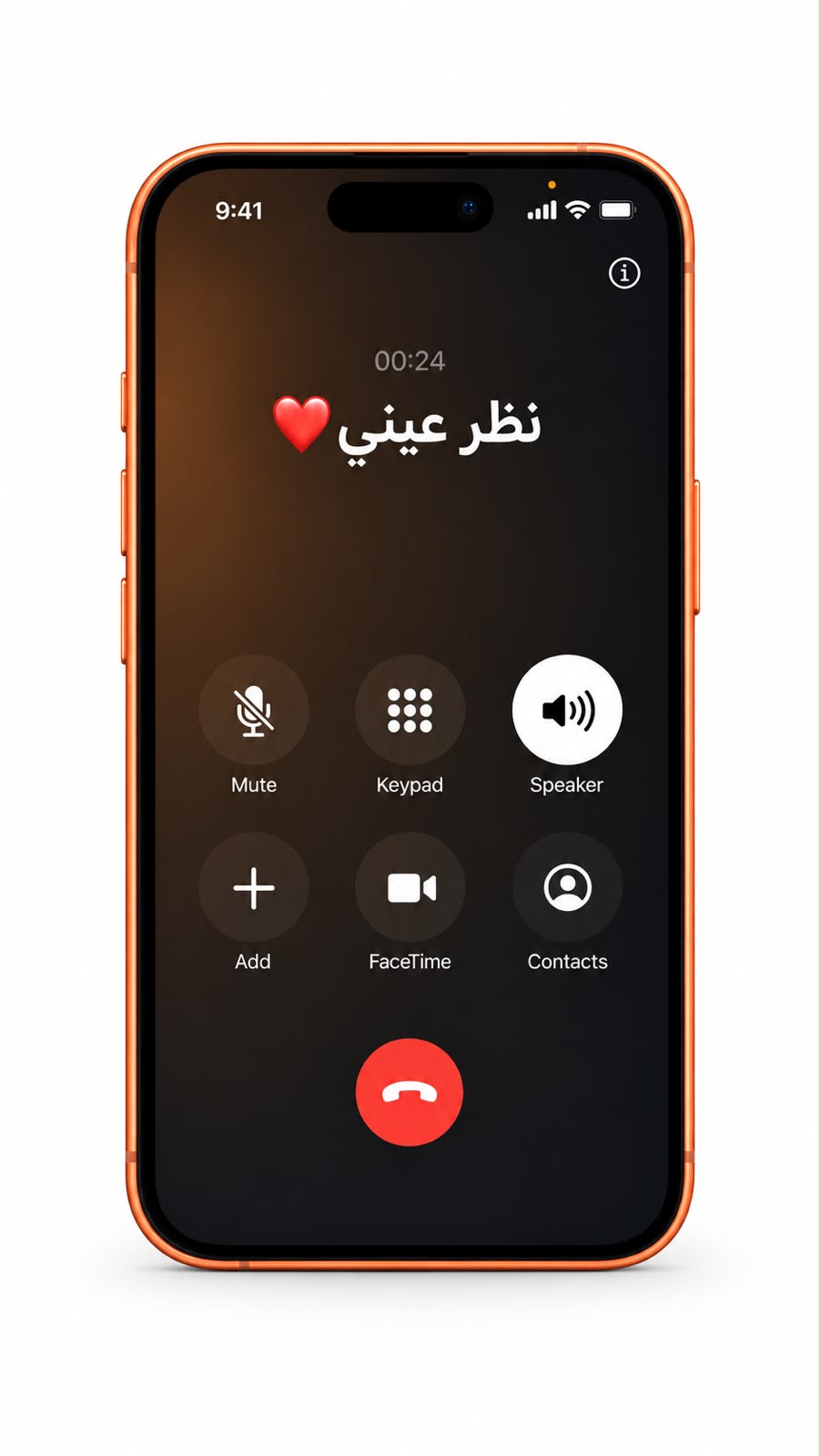
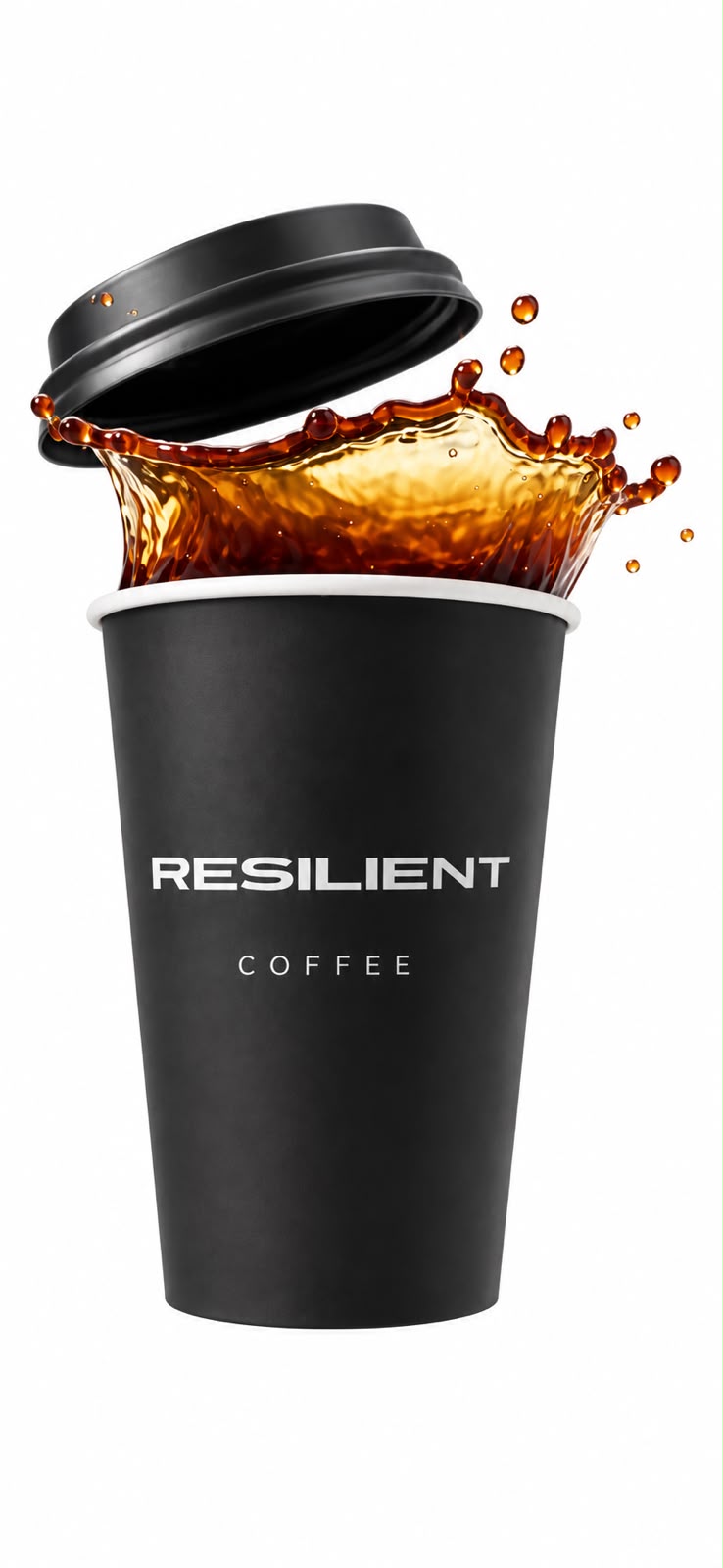
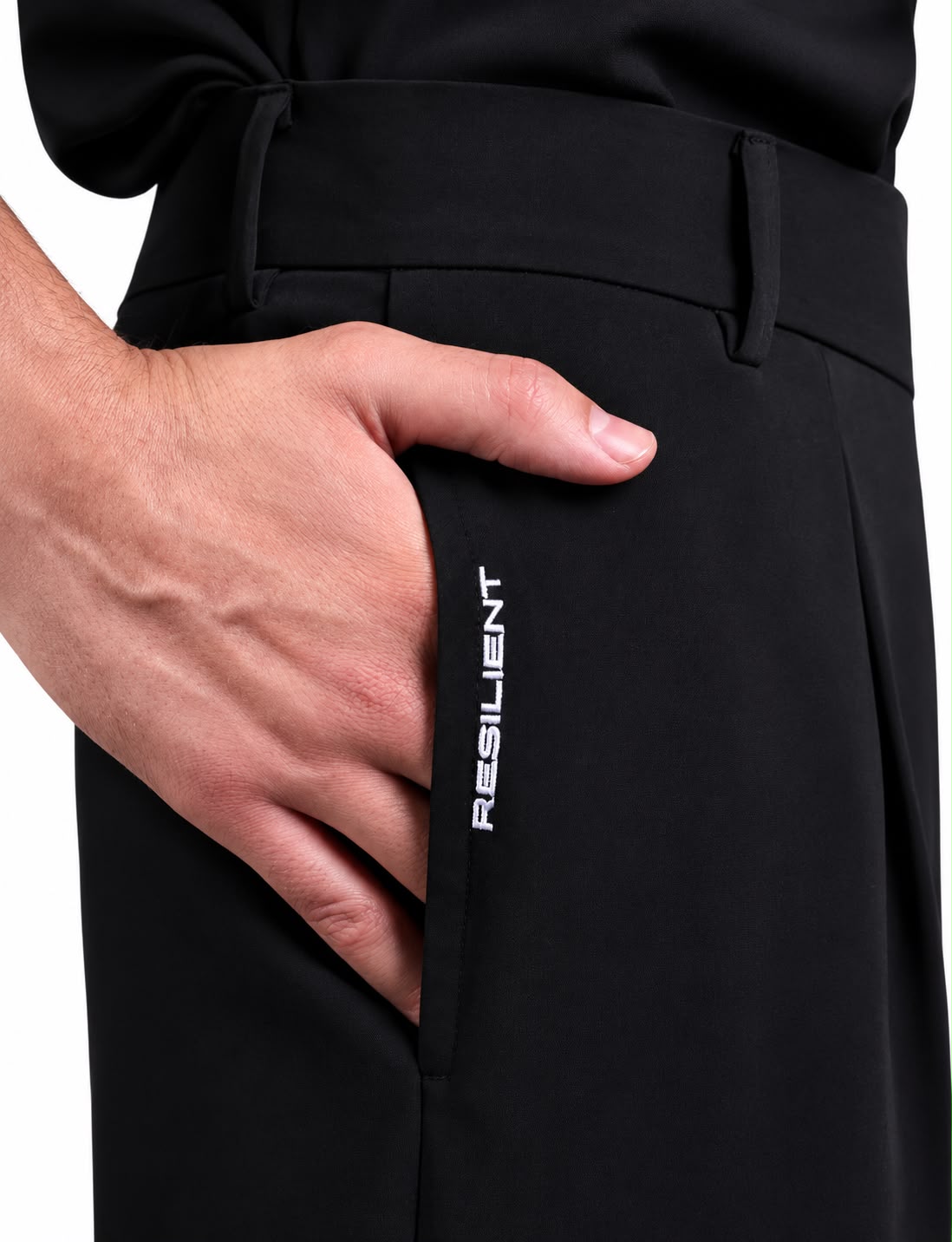
Keep one subject per image and make every important detail easy to read: the character, location, sunglasses, phone, coffee cup and the RESILIENT pants-pocket logo. Clean references make it easier to keep identity, products and logo placement consistent from shot to shot.
Step 3: Generate the Film
Tool used
Higgsfield, Seedance 2.5.
Settings
The final sequence is 20 seconds in vertical 9:16. The prompt defines the camera movement, scene timing, action and sound direction so the entire film follows one continuous visual idea.
Using the references
Upload the character and object references with the video prompt, and match each image to the corresponding description before generating.
Create a professional, ultra-cinematic, photorealistic 20-second video in vertical 9:16 Instagram Reels format. Follow the attached reference images precisely. Preserve the exact sequence, actions, product designs, colors, identity, environment, and sound requirements below.

REFERENCE ACCURACY

Use my attached face-only photograph as the primary facial identity reference. Preserve my exact facial structure, features, eyes, nose, mouth, beard, hairstyle, skin tone, and natural smile throughout the entire video. Maintain my identity during walking, falling, sitting, drinking, smiling, and speaking.

Use the attached full-body and clothing references for my body proportions and complete RESILIENT outfit. Match the original clothing design, colors, fit, fabric, seams, stitching, and embroidery. Show luxurious, realistic fabric detail without changing the garments.

Reproduce the WHITE SHOES exactly as shown in the attached image. Preserve their shape, design, material, sole, and color.

Match the RESILIENT sunglasses, orange phone, and RESILIENT coffee cup precisely to their respective attached references. Keep every product consistent throughout the video.

EXACT 20-SECOND SEQUENCE

00:00–00:01.5 — WHITE SHOES AND STRONG FOOTSTEPS

The very first frame shows a cinematic ground-level close-up of my WHITE reference shoes as I walk.

Track the shoes smoothly near the pavement. Show realistic foot placement, weight transfer, ground contact, and moving shadows.

Use strong, crisp, cinematic footstep sounds precisely synchronized with each step. Preserve the natural character of the footsteps while giving them a powerful presence.

00:01.5–00:03 — ZOOM OUT AND REVEAL

Smoothly zoom out and pull back while tilting upward to reveal my full body.

Show the RESILIENT outfit and its luxurious fabric, construction, seams, stitching, and original branding in clear cinematic detail.

I am wearing the reference RESILIENT sunglasses. I hold the phone in one hand, with an active call to “نظر عيني,” and the reference RESILIENT coffee cup in my other hand.

My expression and natural smile match my face reference. My facial features remain unchanged.

The call is visually established, but no conversation is audible. The only spoken words in the video occur at the ending.

00:03–00:04 — COLLISION AND GRADUAL SLOW MOTION

An adult woman carrying document folders and loose papers accidentally bumps into my body while walking past.

Show clear, believable accidental body-to-body contact. I lose balance and begin falling backward.

Her folders and papers scatter into the air. At the moment of collision, gradually transition from normal speed into extreme slow motion.

My sunglasses slip off my face first. The phone and coffee cup leave my hands naturally as the same action unfolds.

Keep the papers visible within the scene without covering my face, the products, the phone screen, or the pants-pocket logo.

00:04–00:05.5 — RESILIENT SUNGLASSES

The sunglasses fly forward in extreme slow motion. The camera gradually approaches them, revealing their exact reference design and RESILIENT branding.

I remain visible BEHIND the sunglasses, still falling backward. Frame me so I can be seen THROUGH the sunglasses lens. Preserve realistic lens transparency and reflections without hiding me.

The phone is positioned behind the sunglasses along the upcoming camera path.

Push the camera smoothly through one sunglasses lens, using a seamless optical transition to reveal the phone beyond it. The sunglasses remain intact and unchanged.

Add a precise cinematic air whoosh that follows the camera movement.

00:05.5–00:07 — PHONE AND ACTIVE CALL

Emerge from the lens transition into a clear close-up of the same phone, suspended in extreme slow motion.

Show an ACTIVE CALL screen with the exact Arabic contact name:

نظر عيني

Place a RED HEART immediately to the LEFT of the contact name from the viewer’s perspective. Position the heart separately from the Arabic text so that right-to-left rendering does not move it to the wrong side.

Keep the Arabic lettering correctly connected, readable, stable, and unmirrored. Match the phone’s design and color to the reference.

I remain visibly behind the phone, continuing the same backward fall.

Use a controlled cinematic air whoosh for the transition. Do not add an audible phone conversation, ringtone, or beeping.

00:07–00:09 — RESILIENT COFFEE AND LIQUID SOUND

Move smoothly from the phone toward the same reference coffee cup.

Clearly reveal the original RESILIENT branding on the cup. The lid separates and flies away as coffee spills from inside the cup in an elegant, physically believable stream and suspended droplets.

Show realistic liquid texture, surface tension, reflections, and motion. Only part of the coffee spills, leaving enough for the later sip.

I remain visibly BEHIND the coffee cup and liquid, still falling backward in the same continuous slow-motion moment.

The three product shots—sunglasses, phone, and coffee—must all retain me in the background. Do not turn them into isolated product shots.

Preserve a clear, rich, synchronized coffee sound: liquid moving inside the cup, pouring out, and splashing. Make the coffee sound an audible feature of this shot.

Add a short air whoosh during the transition into the coffee shot.

00:09–00:10.5 — ORIGINAL PANTS-POCKET LOGO

After the coffee shot, move the camera downward toward the ORIGINAL RESILIENT logo already present on the pants pocket in the attached reference.

Show that exact existing embroidery, in its exact original position relative to the pocket and seams.

Do not write a new word.
Do not create another logo.
Do not add a second logo beside the original.
Do not move the logo to another part of the pants.
Do not put the logo on the T-shirt.
Do not change its spelling, design, color, size, orientation, or stitching.

Treat the original logo as part of the physical garment. It follows the fabric naturally as the pants move and fold. Move the camera to the logo’s actual location rather than relocating the logo for the shot.

Show the embroidery threads and fabric texture in luxurious detail.

A soft, natural ray of sunlight gently passes across the ORIGINAL embroidery, creating an elegant cinematic highlight. Add a restrained, refined, non-vocal sound accent synchronized with the light.

The sunlight must illuminate the existing logo without producing extra lettering, duplicate embroidery, or artificial glowing graphics.

This entire logo shot remains in slow motion.

00:10.5–00:14 — NORMAL SPEED, LANDING, SITTING, AND COFFEE

After the pants-pocket logo shot, smoothly return to normal speed and pull the camera back.

I complete the backward fall and visibly land on the ground with believable body movement and a synchronized cinematic landing sound.

I then sit upright on the ground and visibly take hold of the same coffee cup. Maintain its continuous trajectory and position within reach. Do not make it disappear and reappear, duplicate, or refill itself.

While seated, I take a small sip of the coffee remaining inside the cup. Then I lower the cup and place it beside me.

Keep the action fluid and concise. Show the actual sequence: land, sit up, take the cup, sip, and set it down.

I look toward the camera and smile naturally. Preserve my exact reference face during every movement.

00:14–00:20 — JORDANIAN ARABIC DIALOGUE AND DOWNWARD GESTURE

While seated, after putting down the coffee, I look directly into the camera with a natural, knowing smile and say:

“بعرف بتنتظر البرومبت، اكتبلي بالكومنت ريزيليانت، وببعتلك ملف كامل خطوة بخطوة.”

Speak this exact sentence in natural JORDANIAN ARABIC. “ريزيليانت” is the spoken pronunciation of RESILIENT.

As I say “اكتبلي بالكومنت,” point downward with my index finger toward the bottom of the frame, indicating the comments section. Synchronize the gesture with those words. Keep the hand and finger anatomically correct.

Deliver the line clearly, confidently, and naturally within the final six seconds. Do not add long pauses, repeat words, omit words, or cut off the ending. Do not speak while sipping.

If a voice reference is supplied, use it to match my voice. Maintain accurate Arabic lip synchronization and preserve my exact facial identity.

Lower the background sound beneath the dialogue so every word is understandable.

Finish with me seated on the ground, facing the camera with a natural smile. Keep the entire video exactly 20 seconds long.

LOCATION AND BACKGROUND

Match the attached location image precisely: buildings, street, pavement, colors, perspective, and environmental details.

Include luxurious cars consistent with the supplied images, featuring realistic Dubai and Abu Dhabi license plates. Preserve reference plate numbers where visible and keep the plates consistent throughout the video.

Include a small number of pedestrians walking naturally. Some briefly glance toward me after the collision. Keep their reactions subtle and silent.

Maintain the same location and consistent lighting throughout.

CAMERA, MOTION, AND CONTINUITY

Use a powerful, polished cinematic visual style with smooth camera movement, controlled depth of field, realistic highlights, rich contrast, and visible detail in the clothing.

Make the sequence feel like one connected camera journey:

White shoes walking → full-body reveal → accidental collision and flying papers → sunglasses → through the lens → active-call phone screen → spilling coffee → original pants-pocket logo and sunlight → return to normal speed → landing → sitting → coffee sip → cup set down → smile and spoken line with downward pointing gesture.

During the sunglasses, phone, and coffee shots, keep me recognizable behind each object as I continue the SAME fall. Use enough depth of field to retain my presence.

Do not restart the fall or change my position arbitrarily between shots. Maintain consistent object trajectories, scale, lighting, and spatial relationships.

The sunglasses come from my face; the phone and coffee come from my hands; the folders and papers come from the woman’s hands. Nothing appears from nowhere.

Keep the slow-motion action continuous until after the pants-pocket logo shot. Then return to normal motion for the landing and all remaining actions.

CINEMATIC SOUND DESIGN

Create strong, engaging cinematic sound design synchronized to the visible action:

* Powerful, realistic opening footsteps.
* Subtle nonverbal street ambience.
* A believable collision sound.
* Papers and folders moving through the air.
* Controlled air whooshes between product shots.
* Clearly audible coffee pouring and splashing.
* A subtle sound accent for sunlight crossing the original embroidery.
* Natural landing, clothing, cup-handling, sipping, and cup-placement sounds.
* The exact final Jordanian Arabic sentence.

Keep the sound polished and impactful without overwhelming the coffee sound or closing dialogue.

No narration, extra dialogue, background conversations, singing, vocal samples, screams, gasps, or spoken brand announcements.

No “baby baby,” “بيبي بيبي,” repeated electronic beeping, or ringtone.

The closing sentence is the ONLY speech in the video.

FINAL ACCURACY REQUIREMENTS

Preserve all attached reference designs, colors, products, clothing, shoes, facial features, and location details.

Do not add subtitles, captions, floating text, extra branding, title cards, or an end card.

Do not duplicate any person, product, cup, or logo. Do not distort faces, hands, fingers, clothing, Arabic lettering, or embroidery.

Follow the specified opening, ending, movements, transitions, slow motion, normal-speed recovery, sound effects, and dialogue exactly.
Step 4: Sound and Final Polish
Sound effects
The sound direction was included in the same Higgsfield and Seedance 2.5 workflow rather than built in a separate sound-effects application.
Editing
Pacing, transitions and the slow-motion moments were handled inside the same workflow for this result.
Grab every prompt from this tutorial in one tap.
Questions about RESILIENT
Which tools were used to make RESILIENT?
RESILIENT was made with Higgsfield and Seedance 2.5. The sound direction, pacing, transitions and slow motion moments were all handled inside that same workflow, as described in the final step of this tutorial.
Can I reuse the prompts for my own video?
Yes. Every prompt is published on this page and can be copied in one tap. Use them as a starting point and adapt the characters and scenes to your own idea.
Why are the prompts in English on the Arabic page too?
The prompts are kept exactly as they were used, in English, so the result stays reproducible in the same tools.